2010年6月29日星期二

A Deal on a Haircut? That’s What Friends Are For

Last week, I went to my hair salon and paid half of what I usually spend because of a deal that I—and more than 2,000 other people—bought online two months earlier. When I bought the deal, I suggested it (via email) to two friends, who each bought it and I was rewarded with two $10 credits. I used those to buy a deal at a local restaurant that gave me $40 toward food and drink for just $20. And the cycle continues.

Welcome to the world of group buying, Internet style, where the power of the Web can be utilized to offer surprisingly large discounts to a sizable number of people for things they actually want to buy.

Many of the group-buying sites work by negotiating deals with local merchants and promising to deliver crowds in exchange for discounts. The sites differ from other buying sites in how they work and what they do to reward users who share deals.

Several of these group-buying sites are available nationwide, mostly in big cities. I focused on Groupon.com, which is available in 42 cities, and LivingSocial.com, which works in 13 cities. Both are popular in Washington, D.C., where I live, though others may be more well-known in your area. If group-buying sites aren’t popular near you yet, they may soon start working there thanks to business models that allow them to work in all sorts of locations.

MOSSBERG2

Other sites offer similar or slightly different selling techniques. Woot.com, a pioneer of group buying on the Web, started in 2004 by specializing in flash sales, selling a different item each day for just 24 hours or until it sells out. The site evolved from a wholesale distribution company and is known for its focus on selling technology gadgets. Another site called Tippr.com works in Seattle (not D.C., where I live, so I can’t yet use it) and uses a patented technology that makes discounts bigger as more people join a deal. New York-based Gilt.com and Ideeli.com focus on selling high fashion items at less expensive prices and can offer deals that last longer than a day.

Here’s how sites like Groupon and LivingSocial work: They ask retailers in a city to offer steep discounts ranging from around 50% to 90% off on things that would appeal to locals. Examples include 79% off spa services, 54% off at paintball, 57% off at a restaurant with Malaysian cuisine and half off for doggie day care. The site lists one retailer a day and takes a portion of the revenue generated by a deal. (Groupon usually takes half while LivingSocial takes between 30% to 50% depending on the arrangement with the merchant.)

Some sites, like Groupon, will only make the deal official if a certain number of people purchase it, while LivingSocial and others offer the deal regardless of how many people buy it.

People can be notified of these deals by signing up for daily emails from the site or by checking social networks like Twitter and Facebook. They may then purchase deals by logging onto the group-buying site and printing vouchers from the site. With most sites, you’re buying a deal for at least half off the real cost (i.e. paying $20 for $40 at a restaurant).

Both Groupon and LivingSocial will work with iPhone apps. Once downloaded, users can enter their login credentials into these apps so they can access that account’s purchased deals, allowing them to show the coupon on the iPhone at the establishment to get the deal.

Each deal comes with restrictions. For example, most of them expire within about six months or so (the date is printed on the coupon voucher and saved in your online account so you don’t forget). Some deals restrict the number of coupons per person, like the way my salon’s deal restricted people from buying more than three coupons; if three were purchased, they all had to be used in the same visit.

MOSSBERG3

Since these sites work best when many people use them, they use a rewards system to motivate people to tell their friends about the deals they’ve bought. If someone shares Groupon with a friend using a special referral Web link, that friend must sign up for the site within 72 hours of clicking on the link. Then, when that person makes a purchase, the original sharer gets a kickback of $10 in Groupon credit to use toward future deals. This won’t work if the invitee isn’t a first-time Groupon customer.

LivingSocial’s rewards system works a little differently. If you buy a deal and share it with friends using a special Web link, you can get the deal free of charge if three friends use that link to sign up for the site and buy the deal. Separate from that, LivingSocial encourages users to invite friends to simply sign up for the site. If the invitee signs up, he or she gets $5 toward deals. If he or she purchases a deal, the original inviter also gets $5 toward deals.

Both Groupon and LivingSocial put a lot of emphasis on choosing deals that will serve as city guides to the hip and fun activities going on around town. Groupon divides some of its 42 cities into areas: For example, Washington, D.C., is divided into The District, Northern Virginia and Montgomery County—three unique zones that locals will appreciate seeing listed separately.

Not every deal is successful on group-buying sites. Groupon’s idea of selling tours of Gary, Ind., shortly after Michael Jackson’s death didn’t convince enough buyers to want to visit the King of Pop’s hometown. LivingSocial admits that some of its deals were too specific to be popular, like a dog-training class that didn’t fetch enough buyers. The site’s CEO Tim O’Shaughnessy says there might not have been enough people with new dogs at the time of the deal.

If you haven’t tried one of the many group-buying Web sites and you live in an area where they’re available, you’ll want to check them out—or find someone who already uses them to invite you so you can both get rewarded.

Reliance to Sell Tower Assets to GTL

Reliance Communications Ltd. said Sunday it agreed to sell the tower assets of its Reliance Infratel unit to Indian telecom infrastructure company GTL Infrastructure Ltd. as it seeks to reduce its debt and fund expansion.

Reliance Communications and GTL said the deal, for an undisclosed sum, will create a combined entity with more than 80,000 towers and an enterprise value of more than 500 billion Indian rupees ($11 billion).

It is the first stake sale in any Reliance ADA Group company, headed by billionaire Anil Ambani, which had been stifled by a right-of-first-refusal clause under a 2005 agreement between Mr. Ambani and his older brother Mukesh Ambani. The noncompete pact recently was scrapped.

The Reliance Infratel deal seeks to establish an independent tower firm that could attract other competing telecom operators to lease space as demand for such infrastructure surges in India, the world’s fastest growing telecom market.

Read the rest of this post on the original site

2010年6月27日星期日

LG Goes Android With Optimus Q

LG Electronics has been riding on the success of its “Chocolate” slider phone for years, but since the device’s 2005 launch, it’s struggled to come up with a popular follow-up.

Now the South Korean cellphone maker, the world’s third-largest behind Nokia and Samsung, is betting on a new Android-powered smartphone called Optimus Q.

Its operating profit margin from its handset business fell to 0.9 percent in the first quarter ended March 31, from 6.4 percent a year earlier.

The Optimus Q features a 1-gigahertz CPU and a 3.5-inch high definition screen. It has a 5-megapixel camera and its memory storage capacity can be increased to 32 gigabytes. It retails for around $758 in South Korea.

But with plenty of other smartphone options in the market from Apple (AAPL), Nokia (NOK), Samsung and Research in Motion (RIMM), does LG’s new phone have a chance to compete?

Read the rest of this post on the original site

2010年6月26日星期六

How to change iPhone Wallpaper

Here are the easy steps you can take to change iPhone Wallpaper easily.

Make preparations:
Step 1: Find an image that you would like to use as wallpaper from iPhone Wallpaper.
Step 2: Right-click on a PC or control-click on an Apple computer and select "Save As" to save the image to your computer. Save it to your "My Pictures" folder or iPhoto library on a PC or Apple respectively, or wherever you prefer to store your images on your computer as long as you will be able to easily locate it.
Step 3: Connect the iPhone to your computer with the USB cable and wait for iTunes to launch itself automatically. Click on the "Photos" tab in the side panel.
Step 4: Click on the "Sync Photos From:" tab in the "Photos" menu on iTunes and locate the folder where your photos are stored. Select all of the images that you would like to transfer your to iPhone. Click on "Sync" in iTunes to transfer all of the photos to your iPhone.

Change iPhone Wallpaper
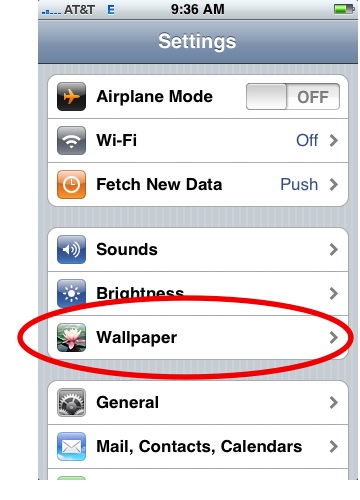
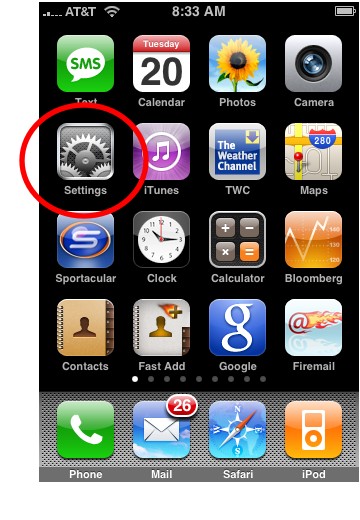
Step 1: Tap Settings on the iPhone’s home screen:

Change iPhone  Wallpaper

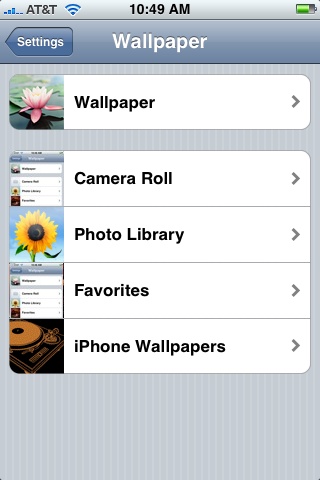
Step 2: Tap the Wallpaper tab:

Wallpaper Tab in iPhone Settings

Several tabs should appear, including one that says Wallpaper. You can tap any of the tabs to select wallpaper for the iPhone. The Wallpaper tab features a collection of pictures supplied by Apple. The other tabs feature pictures you have added to the iPhone, including those taken with the iPhone’s camera.

Wallpaper Selections

Step 3: Tap any picture. A preview screen of the wallpaper will appear, along with the words Move and Scale at the top. You can pinch and reverse pinch the picture to resize. The transparent bars at the top and bottom simulate the bars for the clock and Slide to unlock that will eventually display on top of your wallpaper.
In the example below you can see that the heads of the two peoples will be partially covered by the top bar:

Resize iPhone Wallpaper

To fix, I will reverse pinch to expand the picture, then drag the picture so that their faces appear in the center:

Resize iPhone Wallpaper
Step 4:
Tap Set Wallpaper to finish.
To view your new iPhone wallpaper, put the iPhone to sleep by pressing the sleep button on the top of the iPhone. Then hit the home button to wake the iPhone, and you should see the wallpaper.
Note the position of the clock and Slide to unlock transparent bars. If you’re unhappy with the position of the wallpaper, repeat the steps above.

2010年6月25日星期五

How to share the iTunes Music and videos between two computers for free

Some people may meet that situation: You and your brother both have iTunes library under the same credit card account. Occasionally, you want to get the same song, however you wouldn't want you both to pay the $0.99 where virtually the same account is purchasing the song twice. So how can you and/or he download the songs from each other once it's purchased on a single computer? This is a guide to tell you how to share iTunes Music and videos between two computers such as sharing iTunes Music and videos between Windows PC and Mac OS X, sharing iTunes Music and videos between Mac OS and Mac OS X and sharing iTunes Music and videos between Windows PC and Windows PC

Step 1, Networking computers.
If you want to share iTunes videos and music between computers, you need to network PC and Mac first.
If you do not know how to Network Windows with Mac OS X, go there:
Networking Windows (2000/XP/2003*) with Mac OS X (10.3/10.4)
Information you will need to know
1.The IP Address of your PC (Start > Run > CMD {return} > "ipconfig" {return})
2The IP Address of your Mac (Applications > Utilities > Terminal {Run app} > for ethernet connection "ipconfig getifaddr en0" {return} or for wireless "ipconfig getifaddr en1" {return})>
3.The workgroup the PC is in (Right click on My Computer, select Properties, and select the Computer Name tab)

System Configuration
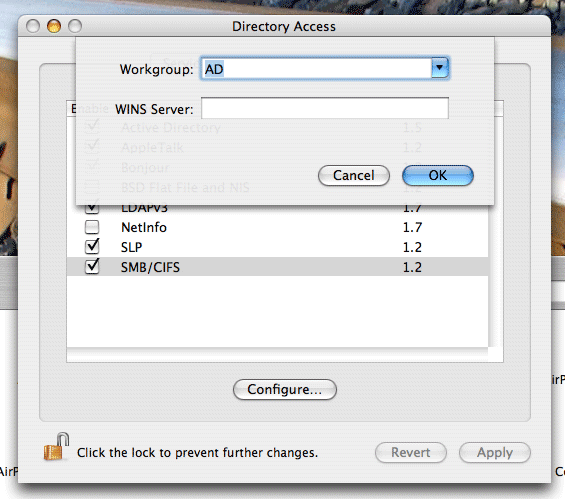
It is important that the account you log in with on your XP system has a password set, if it does not you will not be able to login to your Windows share from OS X. You need to put your Mac in the same workgroup as your Windows PC. To do this open "Directory Access" (Applications > Utilities > Directory Access). Click on the padlock in the bottom left corner to make changes; you will be prompted for your password. If "SMB" is not ticked off, then tick it off. Select "SMB" and hit the "Configure…" button. Now enter the name of your Windows workgroup. In my case the name is "AD".

Share iTunes videos between pc and Mac, iTunes videos from pc to  Mac

Setting up the PC to share files
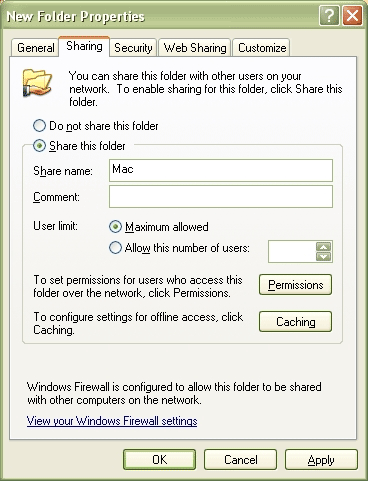
You need to create and share a folder on your PC that you will then access from your Mac. To do this create a folder (or select and existing one) right click on it from Windows Explorer and select "Properties". Select the "Sharing" tab and share out the folder. I'd recommend you use a one word name for the share. For example "Mac", not "Apple Mac Share", it just narrows the risk of complications.

Share iTunes videos between pc and Mac, iPod videos from pc to Mac

Setting up the Mac to share files
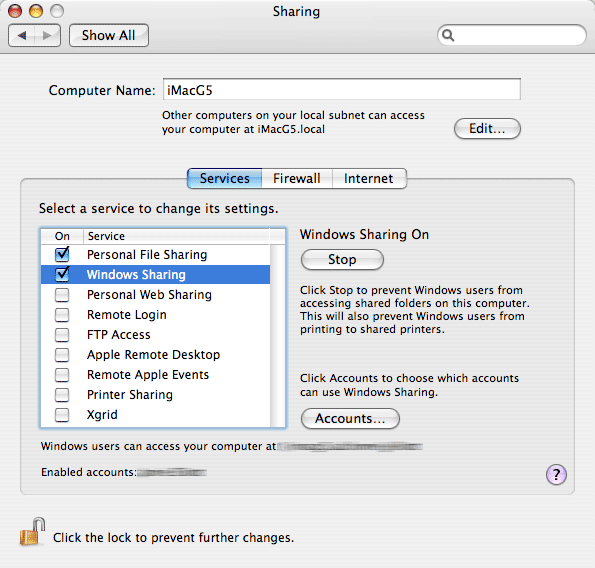
Open "System Preferences" (Applications > System Preferences). Go to "Sharing" under "Internet & Network", and tick off "Windows Sharing", and if it doesn't start by itself, click "Start". This will share out your entire home folder.

iTunes videos from pc to Mac

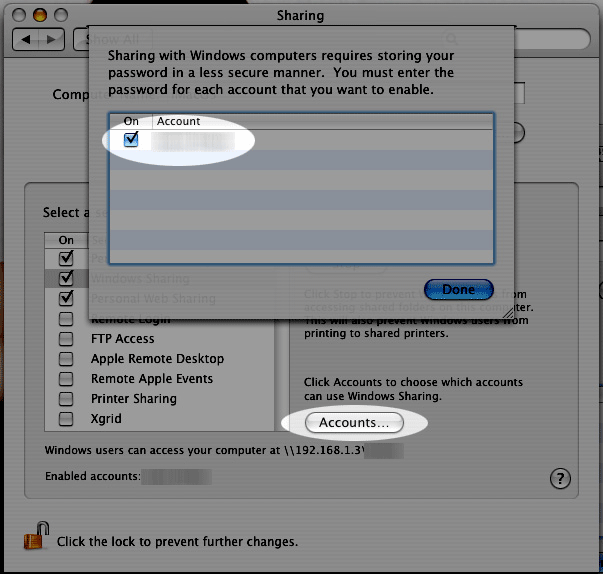
If You're running Tiger (10.4), you will also need to click the "Accounts" button and tick off the box next to your account name so that OS X knows to share out your particular home folder.

iTunes videos from pc to Mac

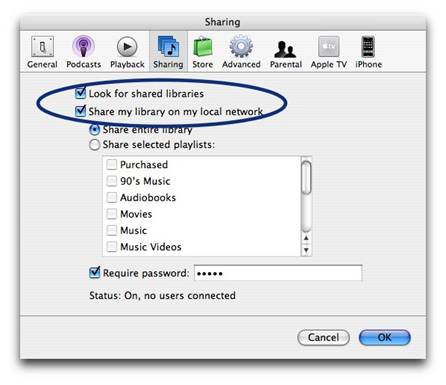
Step2, Go to preferences, under the sharing tab, enable "Share library..." and "Look for shared libraries..." on both computers.
Select the items you want to share.share iTunes videos and music for free

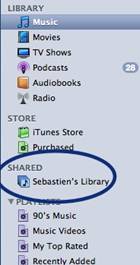
It will show up in iTunes' side panel:
share iTunes videos and music for free

To require users to enter a password before they can see your shared items, select "Require password" and enter a password.
You will need to authorize both computers to play purchased content however. You may authorize up to 5 Machines per iTunes Music Store account.
Tips:If you want to share music with other users on your computer ,read this article: iTunes: How to share music between different accounts on a single computer

2010年6月22日星期二

How to fix error while burning DVD with iDVD

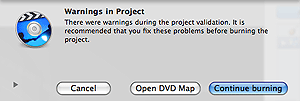
If you found message warning while click “Burn” in iDVD program. As same as pictures below:

iDVD error

Following these steps, you can fix the error:
1. Message warning click “Open DVD Map”.
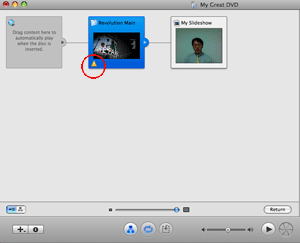
2. New window will display. Find out yellow triangle and “!” inside.

iDVD error - yellow triangle

3. Correct any mistake and then try to burn again.

Fujitsu Pushes for Overseas Growth

Masami Yamamoto will lead his first annual shareholder meeting Monday as head of Fujitsu Ltd. But much of investors’ talk is expected to be focused on the controversy surrounding his predecessor.

Before 56-year-old Mr. Yamamoto took the reins of the Japanese technology company in April, a scandal erupted over his predecessor’s departure. When former President Kuniaki Nozoe abruptly resigned last year, the company initially said he was ill. But in March, Mr. Nozoe said Fujitsu had forced him out over allegations of ties to organized crime–claims that he denies.

Last week, the battle seemed to turn in the company’s favor when a local district court rejected Mr. Nozoe’s petition to be reinstated as a director.

Read the rest of this post on the original site

2010年6月20日星期日

Why Investors Value Apple More Than Microsoft

Ever since Apple (AAPL) passed Microsoft (MSFT) in market value, I’ve been thinking about the vast disparity in their profits. The two companies have similar valuations ($231 billion for Apple, $223 billion for Microsoft), yet Microsoft is far more profitable. In the last 12 months Microsoft has made more than $17 billion. Apple’s profits are a bit under $11 billion.

Read the rest of this post on the original site

Inside Gatorade’s Social Media Command Center

In the realm of marketing, Gatorade is probably best known for splashy commercials featuring some of the world’s most famous athletes. However, a new effort behind the scenes of the PepsiCo (PEP)-owned sports drink maker is putting social media quite literally at the center of the way Gatorade approaches marketing.

The company recently created the Gatorade Mission Control Center inside of its Chicago headquarters, a room that sits in the middle of the marketing department and could best be thought of as a war room for monitoring the brand in real-time across social media.

Read the rest of this post on the original site »

2010年6月18日星期五

How to transfer music from iPod with iPod Rip and iPod Rip for Mac

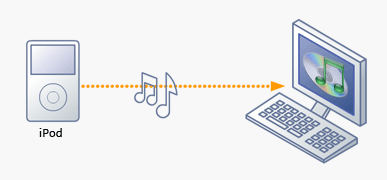
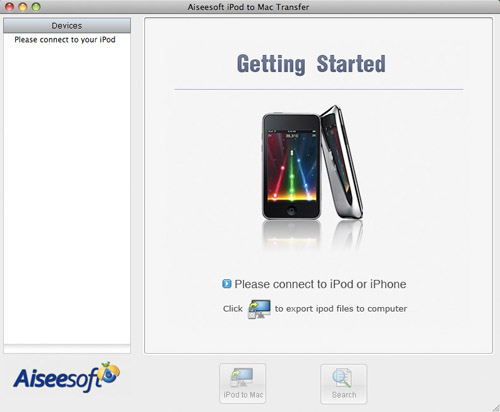
Basically, there is a need for you to transfer music from iPod with iPod Rip and iPod Rip for Mac to avoid your files are lost. Now, I guide you how to Rip your iPod to hard drives with Aiseesoft iPod to Computer Transfer. So you don’t need to worry about losing anything.

iPod Rip to Computer

Step 1: Download Aiseesoft iPod to Computer Transfer and install.

iPod Rip

Step 2: Launch the program
Double-click the icon to run the software; or launch it from the “Start” Menu.
Step 3: Rip iPod files.
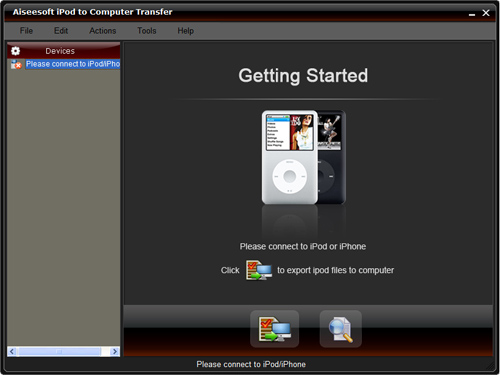
1) Run the software, and connect your iPod/iPhone to your computer via USB cable. After done, the iPod/iPhone icon and its library and playlists will appear in the Device list.
2) Open the library/playlist that you want to export files, and then check the music/movie you want to export in the file list to your computer.
3) Click the "Export to PC" button to select the destination of the exporting files and start ripping files

Otherwise, you could also choose the Export to local option from the Actions menu, and then export the files from your iPod/iPhone to actual device.

Tip: Use “Track filter” function to help you quickly browse your library by genre, artist and album. If you are using Mac, please use the iPod Rip for Mac software.
iPod Rip for Mac download.

iPod  Rip Mac

2010年6月17日星期四

How to import video from camcorder to Mac

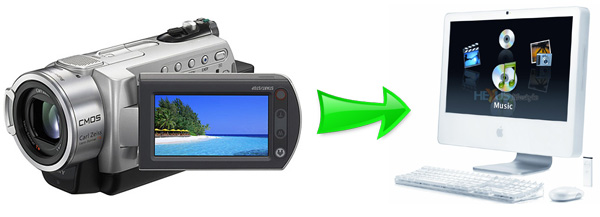
You may be ready to make a movie after you capture great footage with your FireWire camcorder. In this condition, you need import your camcorder to your Mac. More specially, you need to connect your camcorder to your Mac, and then copy footage from the camcorder into iMovie. And when you import video into an iMovie project, it would divide your video into individual clips for the easy editing.

camcorder video to Mac

Part 1. How to Import Video from a Camcorder to your Mac
Step 1: Connect camcorder to your Mac computer with cable (USB/Wifi)
Step 2: Select mode of camcorder such as PC/Computer mode.
Step 3: iMovie will automatic open Import window.
Step 4: If DVD Player automatic open. just quit DVD Player first.
Step 5: So now, you can review your video or select "Import All"(make sure your switch is set to "Automatic").
Step 6: If you select "Manual", you can import some clip to iMovie
Step 7: If you import from Tape based device (DV/HDV), iMovie will automatic revise tape and import all
Step 8: iMovie automatic create thumbnail video after complete import

Part 2. Tips:
iMovie automatically detects your camcorder
iMovie will automatically detect when you have a FireWire camcorder connected. If you see the message No Camera Attached, make sure your camera is turned on and properly plugged in to your computer via a FireWire cable and that your camcorder is set to VCR, VTR, or Play mode. You can also click the Connection Help button for more suggestions.
iMovie supports different video formats
When you create your project, choose the appropriate video format depending on your needs. For importing video from your camcorder, choose between DV, DV Widescreen, HDV 1080i, and HDV 720i. For recording from your iSight, select iSight. If you will be copying MPEG-4 files from your PDA or phone, select MPEG-4.
Import directly to the iMovie timeline
You can import footage directly from your camcorder to the iMovie timeline rather than to the Clips pane. This is a quick and easy way to get your footage into your iMovie project. You can then edit right in the timeline. From the iMovie menu, choose Preferences, click Import, and then choose the option Place clips in Movie Timeline.
If you're importing video that is already edited
Instead of importing your video as separate clips, you can set iMovie to import your video as a single clip. This may be useful if you're importing a movie that you've already edited and you just want to change a small portion. From the iMovie menu, choose Preferences, click Import, and then deselect the "Start a new clip at each scene break" option. If you prefer, select "Limit scene length to" and set a limit for the number of minutes. This will ensure your imported files don't get too large, in case you'll be copying clips between iMovie projects.
What you need to make a high-definition video with iMovie
High definition video is quickly becoming the format you see broadcast on TV. An HD camcorder stores more pixels than a standard camcorder, letting you see more detail in your video footage. iMovie supports importing and editing video from HD camcorders (HDV 720p and 1080i), so you can make movies just like the pros-and it's a great way to archive your most precious life events in the highest resolution possible .
Using video from an MPEG-4 camera
Many digital still cameras, PDAs, and mobile phones let you record short videos in the MPEG-4 format, a standard compression that is used to significantly reduce the file size of video. While iMovie doesn't know how to import video from these devices directly, as it does with FireWire devices, you can still use the MPEG-4 files once you've copied them to your Mac. Just drag them into the iMovie Clips pane using the Finder or import them using Import from the File menu.
Monitor the remaining amount of hard disk space
Digital video clips use a large amount of hard disk space. For example, five minutes of DV footage uses approximately 1GB of space. The same amount of HD video can occupy between 2GB to 4GB, depending on the format and footage. To save hard disk space, import and edit your video in sections instead of trying to do so all at once. You can see how much space remains on your hard disk by using the monitor located in the lower-right corner of the iMovie window.
Using video from your connected or built-in iSight camera
You can record video directly into your iMovie project with your iSight camera. That’s to say, you can add clips to your project spontaneously while you're working on it. Just connect your iSight camera to the FireWire port of your Mac and you're ready to start recording. If you have more then one camcorder connected, such as a camcorder and an iSight,- or you have an iMac with a built-in iSight-choose iSight from the pop-up menu that appears when you switch to camera mode.

2010年6月14日星期一

Everything to PSP

How to watch YouTube on PSP, convert videos for PSP and put DVD movies on PSP? Many PSP users don’t know that. As a crazy PSP fan, I collect some tips that I think are the main steps to go into the world of PSP and share them with all PSP fans here, hope everyone can fully enjoy the fun of PSP.

It will include the following parts:
1. How to watch Youtube video on PSP directly with wifi internet
2. How to rip DVD and convert video to PSP
3. How to download and convert youtube video to PSP for free
4. How to transfer video to PSP
5. How to downgrade PSP
6. How to download free limewire music and video to PSP
7. Where to download free games to PSP

Part1. How to watch YouTube video on PSP directly with wifi internet?
As PSP's web browser only support the older version of flash while YouTube uses flash 9, if you want to watch YouTube on PSP directly with the wifi, you must upgrade to the newest firmware f and install a flash player on your PSP. A Japanese developer NekoMiMi has achieved that with PSPTube. Here are the steps:
Download the PSPTube from here http://www.PSP-hacks.com/file/1225 and open the zip file. Now before putting it in your PSP open the PSPTube.cfg file and press ctrl + F, and type in "DEV" press until you find Dev id="".
Ok now go to http://www.youtube.com/dev create an account and insert the account in between the arentheses.
Extract the PSPTube from the 200over folder and put it in GAME352 folder (Set the Kernel to the 352) Now open it in the PSP and choose an internet connection with the Circle button, it may say no videos, press circle and you'll be able to search.
Here is the control info:
X: Cancel; O: Accept; L/R: Last/Next Page; Start: Pause;
Select: Change aspect ratio (Original Size, Full screen)

Part2. How to rip DVD and convert video to PSP
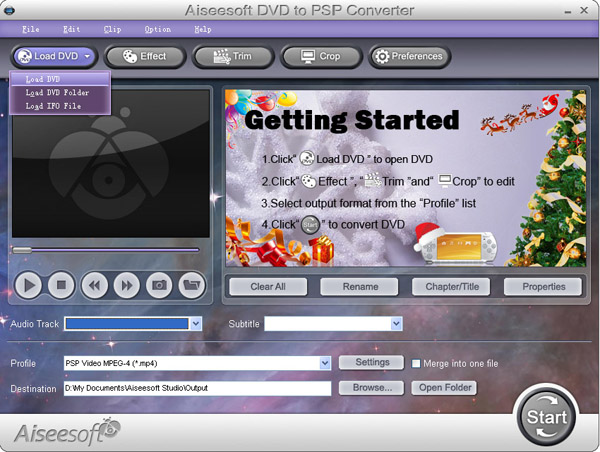
PSP can play only MP4 video, DVD movie is MPEG-2 video and has CSS protected, so you have to rip the DVD movie to MP4, and then transfer it to PSP, If you stick with freeware, you can use DVD Shrink to rip the DVD to computer, and then use PSP Video 9 to convert the ripped file to MP4 video. As for me, I’d prefer using Aiseesoft PSP Movie Creator, it can rip protected DVD movie and convert video to MP4 video, more over, you can also trim or crop the DVD movie to enjoy the video on PSP with full screen, that’s really cool. What you have to do just put your DVDs on your DVD drive, and then click start button to begin the conversion. If you want to learn more about it, you can refer to its official site:
http://www.aiseesoft.com/psp-movie-creator.html

DVD to PSP Converter

Part3. Download free YouTube video to PSP?
YouTube is a place everybody knows for free videos, I often download free videos from it, but the downloaded YouTube video is flv format, so a flv converter is necessary, you can go to this website: http://vixy.net/ .It's a free online FLV converter. Then go to YouTube and find a video that you loved. Copy the URL that in the Red box. Like this format:
http://www.youtube.com/watch?v=sdUUx5FdySs

Then Paste your video URL to the input box (figure above), choose the right format you want. If you want to edit the video, AVI is a good choice. And MP4 is fit for iPod, PSP and other MP4 players, click “start” to start the conversion. When the conversion finished, you will get the download link of the output video. Click the download link to download the video and save it in your computer, then copy the MP4 video to the “Video” folder in the PSP memory stick.

Part4. How to transfer video to PSP
You can download this free PSP video manager, it’s totally free, it can help you transfer MP4 video to PSP directly; fully support all firmware versions of PSP. Here is the download link
http://www.youtubetoipod.biz/software/psp-video-manager.html
what you have to do just add your MP4 video files to the software, connect your PSP to computer via the USB model, and then click Move, done.

Part5. How to downgrade PSP
All downgrades have a chance of bricking PSP, so if you want to, you must aware that there is always some level of risk.

Part6. How to download free limewire music and video to PSP
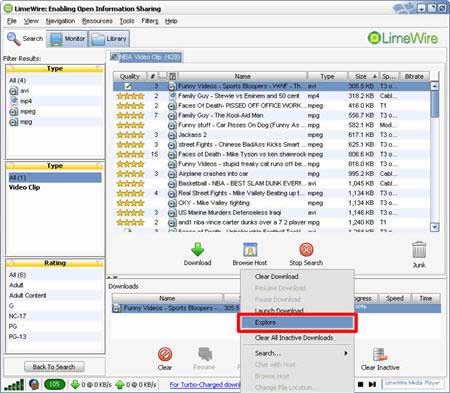
If you like to download free music and video to PSP, limewire is surely your right hand; you can download limewire software free from its official site: http://www.limeware.com, install and run it, then type key words to search the music and video you’re interested in, and then download it.

Limeware to PSP

When you finished download the video, export and located it on your computer. Coz PSP can play only MP4 video, so you have to convert your video, I’d prefer using Aiseesoft PSP Movie Converter to convert video, and help you transfer video to PSP, so you will not be confused by the complicated PSP rule. If you don’t know how to use it, here is a step by step guide about how to use it.
http://www.aiseesoft.com/article/psp-movie-converter.html

Part7. Where to download free games to PSP
I collect some websites to download free PSP games, you can take them for reference, because some just provides a part of free games, please take care of the virus embedded in free games you‘d better install anti-virus software.
http://www.gamespot.com
http://www.PSPblender.com/PSP_games.php
http://www.allPSPgames.com
http://www.bigfishgames.com/
http://www.play4freeonlinegames.com/
http://www.khemer.com/
http://www.gamersenterprise.com
http://www.gamesjax.com/
http://www.playitontheweb.com/
http://www.topstylegames.com/
http://www.playgames2.com/games/Turret-Pong

Free Trial: Download Aiseesoft PSP Movie Creator

2010年6月13日星期日

FBI Opens Probe of iPad Breach

The Federal Bureau of Investigation has opened an investigation into the security breach in AT&T Inc.’s (T) website that exposed the email addresses of some iPad owners.

“The FBI is aware of these possible computer intrusions and has opened an investigation,” said Katherine Schweit, an FBI spokeswoman. Ms. Schweit said the FBI opened the investigation Thursday but it will not comment on what it is looking at. “It’s very early in the investigation,” she said.

AT&T, the sole U.S. provider of wireless service for the Apple Inc. (AAPL) tablets, acknowledged Wednesday that a security flaw in its website made it possible for iPad users’ email addresses to be exposed.

Read the rest of this post on the original site

2010年6月11日星期五

Samsung Unveils Galaxy S

Just as Apple (AAPL) unveiled its new iPhone 4 earlier this week, Samsung Electronics said it is launching the Galaxy S–its latest attempt to gain share in the profitable smart phone segment.

The Galaxy S, which runs on Google’s (GOOG) Android operating system in South Korea, is part of Samsung’s overall global push into the high-end handset segment. The Korean electronics giant, which is also the world’s second-largest maker of cellphones by shipments behind Nokia (NOK), hopes that Galaxy S will allow it to catch up with other smart phone makers, including Apple and Research In Motion (RIMM), after it lost some ground in the market with a lack of attractive line-ups and user-friendly devices.

The Galaxy S is 9.9 millimeters thick and features a 1-gigahertz CPU and a 4-inch AMOLED screen. It has a 5 megapixel camera and 16 gigabytes of memory storage. The touch-screen device also allows video calls, and users can tap into Google’s various applications including Gmail and YouTube.

Read the rest of this post on the original site

2010年6月10日星期四

Netflix Coming to iPhone, if AT&T (And Your Phone Bill) Can Keep Up

Here’s another bright, shiny object for Steve Jobs to brandish in front of iPhone owners: News that Netflix is bringing its streaming video service to the iPhone.

The app, demoed onstage at Apple’s developers conference by Netflix CEO Reed Hastings, will be available later this summer. Like the company’s iPad app, it will be free, though you’ll have to be a Netflix (NFLX) subscriber to actually access the company’s catalog of digital movies and TV shows.

And like the iPad app, the app will stream video via both Wi-Fi and AT&T’s wireless service. I checked with Netflix spokesman Steve Swasey to see if Apple (AAPL) or AT&T (T) would limit the amount of bandwidth the app could chew up, and he said no: “Same catalog. Unlimited. It will be Netflix as you know it and love it, but in your pocket.”

No caching, though. Like the iPad, you’ll need to be connected to the Web to use the app.

But that’s still pretty cool. And it’s also going to be a lot of strain on AT&T’s network. Which is, um, still pretty strained. I doubt many of you are going to watch all of “District 9” on your phones, but you may well watch an episode of “Weeds” (first couple seasons are pretty good, but then…). And if the carrier can’t handle phone calls, how is it going to keep up with that?

So: Either AT&T really is going to resolve its capacity problems by the end of this summer, as Steve Jobs semi-promised last week at D8. Or everyone involved assumes that AT&T’s new data plans will cut down on the number of people using iPhones to do all the cool, cutting-edge stuff Jobs showed off today.

2010年6月8日星期二

How to watch and play Internet videos on iPod touch and iPhone(3G)

Why do iPod touch and iPhone(iPhone 3G) can not play internet video besides youtube? The reason you can't view videos from other videos sites besides youtube is that they run on something called "Flash". iPhones and iPod Touches can't support Flash because of their software. This is why Apple created the YouTube application on your home screen.
Luckily, someone has done their best to fix this problem.
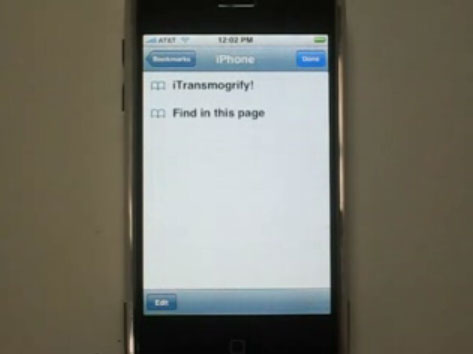
iTransmogrify! is a bookmarklet for iPhone and iPod touch which transforms embedded Flash content into direct links to natively supported formats. That means YouTube videos and MP3s can now be played from the iPhone's Safari web browser with just a few clicks. The iTransmogrify! bookmarklet recognizes and converts a variety of embedded Flash content from web pages so they will play on iPhone and iPod touch.
Currently supported formats include: YouTube, embeds and YouTube pages, Blip.tv, Revver, TED talks and embedded TED talks, Many embeded flash MP3 players ,Kink.fm podcasts, Flickr badges (videos are unsupported) , The Test Suite has more sites.
To install the bookmarklet, just drag the link to your Safari or Firefox Bookmarks, IE users should right click and choose “Add To Favorites” After adding the link, sync your iPhone or iPod touch.

play internet video on iPod touch, play internet video on iPhone

Grab it now: iTransmogrify!
You can also add iTransmogrify from your iPhone!
Then, whenever you find a broken video, just select the bookmark to convert it.
Now, you can watch and play internert videos such as Blip.tv, Revver, TED talks and embedded TED talks, Many embeded flash MP3 players, Kink.fm podcasts, etc on iPod touch and iPhone.
More information, source code and bug-tracking is available on the iTransmogrify Google Code page.

If you want to watch your own videos on iPod touch or iPhone, you can follow this step by step guide: How to convert all video files and extract audio from video on Mac OS X ?
If you want to play dvd movie on iPod touch or iPhone, you can follow this guide: How to rip DVD to all sorts of video and audio files on Mac OS X?

2010年6月7日星期一

How to rip DVD to video audio files like AVI WMV MPEG FLV 3GP MP4 MP3

This step-by-step guide will show you how to rip DVD to AVI, WMV, MPEG, FLV, 3GP, MOV, VOB, ASF, MP4, etc, extrac audio from DVD to MP3, WMA, M4A, AAC, WAV, etc and edit DVD Movie with Aiseesoft DVD Ripper.

If you want to know how to convert AVI, XviD, WMV, MPEG, MPG, FLV, DAT, RM, RMVB, MOV, ASF, H.264 to the format you want, you can learn the guide by clicking here: How to convert Video to other video audio files


This DVD Ripper guide includes 4 parts:
How to convert DVD to iPhone/iPod/PSP/Zune/Apple TV/Phone/PS3/Xbox 360/Zen/Pocket PC/AVI/MPEG/MP4?
How to edit, combine, effect and cut DVD movies?
How to extract and rip audio from DVD to MP3 for iPod nano, shuffle and other MP3 players?
How to put DVD clips on Youtube, Myspace?

What you need is Aiseesoft DVD Ripper; you can download it for free here:
http://www.aiseesoft.com/dvd-ripper.html

Part 1: How to convert DVD to iPhone/iPod/PSP/Zune/Apple TV/Mobile Phone/PS3/Xbox 360/Zen/Pocket PC ?

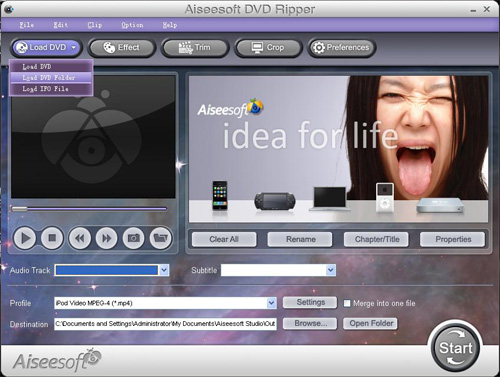
Step1. Insert your DVD disc into your DVD-Rom, then run the software, click "Load DVD" button and add the DVD file. You can also add DVD/IFO from your hard disk by clicking “Load DVD” or “Load IFO File”.

Aiseesoft DVD Ripper - convert and rip DVD to AVI MP4 MPEG for  iPhone iPod

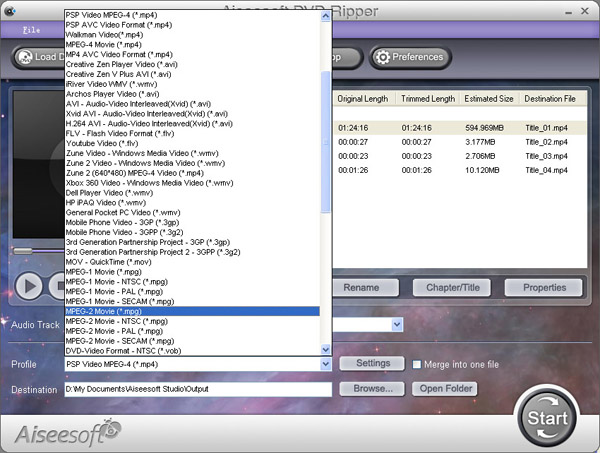
Step2. Ihis software can convert DVD to various video formats such as MPEG-4, AVI, WMV, FLV, 3GP, VOB, etc. Click the "Profile" drop down list to select a format.

Aiseesoft DVD Ripper - convert and rip DVD to AVI MP4 MPEG for  iPhone iPod

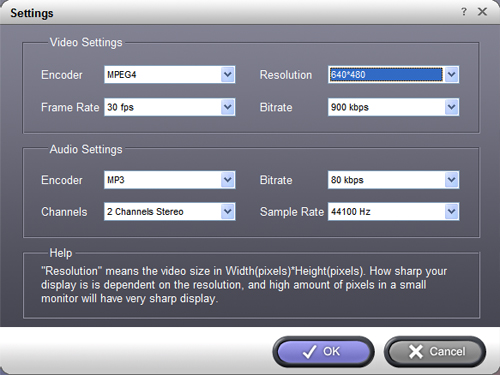
If you don't know much about mobile players, just select a format according to the name of your mobile player. For example, if you want to copy DVD to iPhone, just select "iPhone Video MPEG-4 (*.mp4)", and the default setting works great. If you want to customize the output video, you can click the "Settings" button next to the profile to open the Settings window and set video resolution, frame rate, bitrate, encoder, etc. See the figure below:

Aiseesoft DVD Ripper - convert and rip DVD to AVI MP4 MPEG for  iPhone iPod

Step3. Regular DVD movies usually have several subtitles such as English, French, German, etc. You can select one you prefer. You can also delete the subtitle by selecting "No Subtitle". Selecting Audio is the same.

Aiseesoft DVD Ripper - convert and rip DVD to AVI MP4 MPEG for  iPhone iPod

After the above steps, click "Start" to start conversion.

Next part: How to edit, combine DVD and extract DVD Clips from DVD?

2010年6月6日星期日

How to convert WAV to MP3

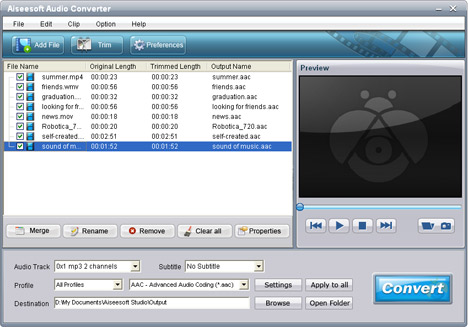
The next tip teaches you how to step by step convert WAV to MP3 with Aiseesoft Audio Converter.

1. Free download the easy-to-use WAV to MP3 Converter, install and launch.

2. Add the WAV music files from the "File" menu.

Convert WAV to MP3

3. Choose the proper output folder and the output MP3 format in Profile list.

4. Click Start button to begin WAV to MP3 conversion. After a few minutes, you can play the converted MP3 files on your portable music devices like PSP, iPod.

2010年6月4日星期五

Did EFF Lawyer Cross Line in LimeWire case?

The lawyers who do most of the jousting over Internet copyright issues were abuzz last week after learning that a federal court judge suggested one of the more prominent among them had advised clients to destroy evidence.

On Wednesday, U.S. District Court Judge Kimba Wood issued a 59-page decision in Manhattan granting summary judgment in favor of the Recording Industry Association of America in its long-running copyright fight against file-sharing service LimeWire. The order opened the door for the top four record companies to force a closure of the service.

Read the rest of this post on the original site